Delphi Tutorial 4: Reaction Timer
In this tutorial you will create a simple game that measures reaction time. The interface makes extensive use of panel objects as status indicators. It also uses a timer control, an image control and two SpeedButtons. This exercise requires great attention to detail in setting the properties of the objects on the screen.
Operation
The program shows and hides an image at random locations within an invisible grid on the screen. While the image is visible it can be “hit” by clicking on it with the mouse button. If the mouse button is clicked on any other part of the screen a “miss” is recorded. If no attempt to click the mouse button is made while the image is visible a “timeout” is recorded. A timer event is used control the rate at which the image moves. “Hits”, “misses” and “timeouts” are recorded in status boxes at the bottom of the screen. After a set number of images are shown the program stops and the average “hit time” is shown.
Program Interface
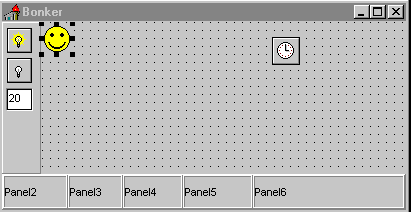
The main form for the program is shown in the screenshot . There are seven panel components on the form although it is possible to see only six of them. Panel1 is used as a container for panels 2-6 and it is essential, when creating the form, to place these panels “inside” panel 1.
Create the form as follows
Left = 241
Top = 156
BorderStyle = bsDialog
Caption = 'Decide this for yourself‘
ClientHeight = 188
ClientWidth = 404
Left = 0
Top = 152
Width = 404
Height = 36
Align = alBottom
Caption = 'Panel1'
| Panel2 |
Panel3 |
Panel4 |
Panel5 |
Panel6 |
|
| Left |
1 |
66 |
121 |
181 |
251 |
| Top |
1 |
1 |
1 |
1 |
1 |
| Width |
65 |
55 |
60 |
70 |
152 |
| Height |
34 |
34 |
34 |
34 |
34 |
| Align |
alLeft |
alLeft |
alLeft |
alLeft |
alClient |
| Alignment |
taLeftJustify |
taLeftJustify |
taLeftJustify |
taLeftJustify |
taLeftJustify |
| BevelInner |
bvLowered |
bvLowered |
bvLowered |
bvLowered |
bvLowered |
| Caption |
'Panel2' |
'Panel3' |
'Panel4' |
'Panel5' |
'Panel6' |
Note the Align property of each panel - Panel6 is aligned to the client (Panel1) - this is to say it fills the space between the right margin of Panel1 (which is effectively the right margin of the form) and the right margin of Panel5.
Left = 0 Top = 0 Width = 39 Height = 152 Align = alLeft
Panel7 is the container for the SpeedButtons and the Edit Box. These controls must not be added to the form itself.
Edit1: Left = 5 Top = 67 Width = 25 Height = 21 Hint = 'Delay = value x 100 (ms)'
Text = '20'
SpeedButton1: Left = 5 Top = 6 Width = 25 Height = 25 Hint = 'Start Game'
NumGlyphs = 2 ParentShowHint = True ShowHint = True OnClick = StartClick
SpeedButton2: Left = 5 Top = 36 Width = 25 Height = 25 Hint = 'Stop Game'
NumGlyphs = 2 ParentShowHint = True ShowHint = True OnClick = StopClick
Program Code
procedure TForm1.MoveBall;
var
NewSlot: Integer;
begin
repeat
NewSlot := Random (144);
until NewSlot <> slot;
slot := NewSlot;
Ball.Left := (slot mod 12) * dx + Panel7.Width;
Ball.Top := (slot div 12) * dy;
Ball.Show;
end;
procedure TForm1.FormCreate(Sender: TObject);
begin
dx := Ball.Height;
dy := Ball.Width;
total_hit:=0;total_miss:=0;
ClientWidth := dx * 12 + Panel7.Width;
ClientHeight := dy * 12 + Panel1.Height;
Randomize;
Panel2.Caption:='';
Panel3.Caption:='';
Panel4.Caption:='';
Panel5.Caption:='';
Panel6.Caption:='';
Ball.Hide;
end;
procedure TForm1.BallClick(Sender: TObject);
var this_time:longint;
begin
if running then
begin
this_time:=GettickCount-tstart;
if sender is TForm1 then
begin
Inc(Misses);
total_miss:=total_miss+this_time;
Panel4.Caption:=' Misses:'+InttoStr(Misses);
Panel6.Caption:=' Miss in '+InttoStr(this_time)+' ms';
end
else if Sender is TImage then
begin
Inc(Hits);
total_hit:=total_hit+this_time;
Panel3.Caption:=' Hits:'+InttoStr(Hits);
Panel6.Caption:=' Hit in '+InttoStr(this_time)+' ms';
Messagebeep(0);
end;
running:=false;
Ball.Hide;
end;
end;
procedure TForm1.StartClick(Sender: TObject);
begin
Balls:=10;
hits:=0;
misses:=0;
total_hit:=0;
total_miss:=0;
timeouts:=0;
Panel2.Caption:=' Targets:'+InttoStr(Balls);
Panel3.Caption:=' Hits:'+InttoStr(Hits);
Panel4.Caption:=' Misses:'+InttoStr(Misses);
Panel5.Caption:=' Timeouts:'+InttoStr(Timeouts);
Panel6.Caption:=' ';
Timer1.Interval:=Trunc(StrtoFloat(Edit1.Text)*100);
Moveball;
Timer1.Enabled:=true;
running:=true;
tstart:=GetTickCount;
end;
procedure TForm1.StopClick(Sender: TObject);
begin
Timer1.Enabled:=False;
end;
procedure TForm1.Timer1Timer(Sender: TObject);
var average:real;
begin
if running then
begin
Inc(Timeouts);
Panel5.Caption:=' Timeouts:'+InttoStr(Timeouts);
running:=false;
end;
Dec(Balls);
Panel2.Caption:=' Targets:'+InttoStr(Balls);
if Balls > 0
then
begin
Moveball;
tstart:=GetTickCount;
running:=true;
end
else
begin
timer1.Enabled:=false;
running:=false;
Panel2.Caption:=' Finished';
if hits>0 then
begin
average:=total_hit/hits;
Panel6.Caption:=' Average Hit Time = '
+FloattoStrF(average,fffixed,8,2)+ ' ms';
end;
Ball.Hide;
end;
end;
end.